sforzando free download
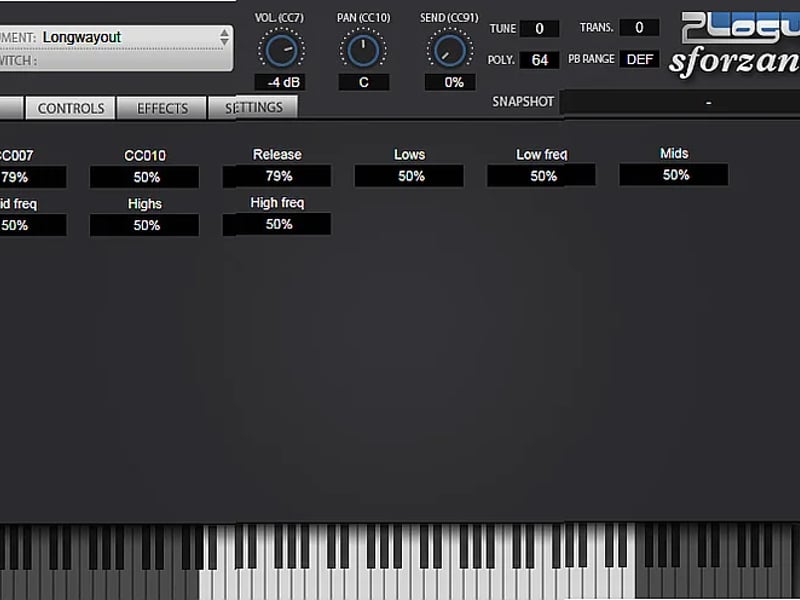
sforzando is a free SFZ player that lets you load and play SFZ format sample banks across any major DAW and operating system. It solves the problem of needing a reliable, non-proprietary player for the open SFZ format, and it can convert your existing SF2, DLS, and acidized WAV libraries into SFZ 2.0. This free download is powered by the same ARIA Engine used in commercial products, but offered here without cost.
Key Takeaway
You get a straightforward sample player focused on the SFZ format. It’s useful if you have or want to create SFZ libraries, or if you need to convert older sample formats like SoundFonts into an open, text-editable format. Since it’s monotimbral and has no effects, it’s a dedicated tool for specific sample playback and conversion tasks.
Core Technology: The ARIA Engine & SFZ Format
At its core, sforzando runs on Plogue’s ARIA Engine. This is the same engine found in paid commercial sample libraries, which means you’re getting proven, reliable playback technology for free. The central idea is support for the SFZ format—a non-proprietary, text-based format for defining sample-based instruments. Because SFZ files are plain text, you can open and edit them in any text editor to tweak mapping, tuning, envelopes, and more. This open approach is a direct alternative to locked-down, proprietary sample formats.
Feature Breakdown
SFZ 1.0 & 2.0 Player
This is the primary function. sforzando loads and plays instruments built in both SFZ 1.0 and the more advanced SFZ 2.0 specification. It reads WAV, OGG, and FLAC sample formats.
Format Conversion Tool
A key capability is converting other sample formats into SFZ 2.0. You can load SF2 (SoundFont), DLS, and acidized WAV files directly. sforzando will then generate a corresponding SFZ file, effectively translating those libraries into the open SFZ format.
Drag and Drop Interface
You load instruments and samples via drag and drop. When you drag a folder containing samples and an SFZ file onto the interface, it sets up the instrument automatically.
Live SFZ File Updates
If you edit an SFZ file in a text editor while sforzando is running, the plugin automatically detects the changes and updates the loaded instrument. This is a major time-saver when creating or tweaking your own libraries.
SFZ Opcodes Parser
The parser checks your SFZ files for errors and will indicate any unknown or incorrectly used opcodes (the commands that control playback behavior). This is a helpful debugging tool for library creators.
MIDI Controls Panel
A dedicated panel gives you MIDI learn functionality for assigning knobs and sliders within your SFZ instrument to physical controllers, without needing to edit the SFZ file directly.
Standalone and Plugin Operation
You can run sforzando as a standalone application or as a plugin within your DAW. It’s available in VST, VST3, Audio Units, AAX, and CLAP formats.
Technical Specifications
It runs on macOS, Windows, and Linux. You can use the 32-bit or 64-bit versions. For plugin formats, it covers VST, VST 3, Audio Units, AAX, and CLAP. It loads these file types: ACIDized WAV, DLS, SF2 (SoundFont), sfz, and WAV.
Who Is This For
This fits a few specific scenarios. First, it’s for advanced sample hobbyists who are building or collecting SFZ format libraries and need a reliable, cross-platform player that works in their DAW. Second, it’s useful if you have a collection of old SF2 SoundFonts or DLS files and want to convert them to a modern, editable format for long-term use. Finally, it’s a solid tool for anyone creating and editing their own sample libraries, as the text-based SFZ format and live update feature make the tweak-and-test cycle very fast.
Limitations
There are no built-in effects like reverb or chorus. It is monotimbral, meaning you can only play one instrument or sound per instance—you can’t layer multiple SFZ instruments within one plugin window. During installation, it adds two other programs (TableWarp and Aria) that are not automatically removed if you uninstall sforzando. It is not a dedicated SF2 player; you must convert SF2 files to SFZ first, and the conversion may not work correctly for every SoundFont. Community support is available, but it’s not direct from Plogue.
Final Verdict
Grab this free download if your goal is to play SFZ sample banks without format restrictions, or if you need to convert a library of SF2 or DLS files into the open SFZ 2.0 format. It’s a focused, no-frills player that does those jobs well. The catch is the monotimbral design and lack of effects, so it’s purely a playback and conversion engine, not a full-featured workstation. If that matches your need for an open-format sample player, it’s worth getting.
We’ve selected a few plugins that might interest you in the Synthesizer category.
Most of them work in popular VST2/VST3 hosts such as FL Studio, Ableton Live, Cubase, Studio One, and REAPER.

 Popular





 Categories


