
XO Free Download: Find and Sequence Drum Samples Visually
Trying to find the perfect kick or snare in a folder of thousands of one-shots can kill your creative flow. XO addresses this by organizing your samples on a visual map and letting you swap them in a click. You can get a free download to see if its approach to drum machine workflow clicks with you.
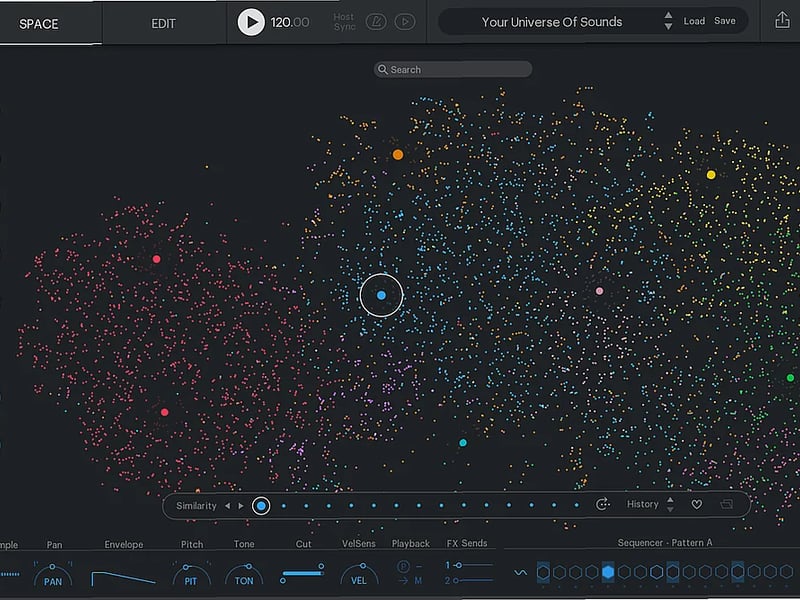
The core idea is simple: it takes your drum samples—especially useful with its included library of 8000 sounds—and plots them on a graph based on how similar they sound. Claps are grouped with other claps, deep kicks sit together, and so on. This visual organization means you stop digging through folders and start clicking on nearby points on the map to instantly audition similar alternatives. It’s built for making beats, where fast decisions matter.
How the Visual Map and Similarity Sorting Work
This isn't just a fancy browser. XO analyzes the sonic characteristics of your one-shot samples and positions them in a 2D space. Samples that sound alike are placed close together. You can further filter this map by sound category, length, and percussiveness to narrow down your search. The "lightning fast sample swapping" means you click any pad in the 16-pad kit, see its current sample highlighted on the map, and then click any other sample on the map to replace it. You can also swap an entire kit for the sonically closest matches, which respects your active filter settings to keep everything in a consistent tonal ballpark.
Building and Editing Your Kit
Each of the 16 sample pads is a mini audio editor. You’re not stuck with a sample as-is. For each sound, you can:
- Edit the sample itself: Set custom start and end points.
- Shape the envelope: Use fade controls, hold, and decay to tailor the length.
- Control the transient: Make hits punchier or softer.
- Adjust basics: Pan, volume, and collapse the sample to mono.
- Route flexibly: Send each pad to one of 8 different outputs or the single master output.
The Built-In Sequencer and Groove
XO includes a 16-step sequencer for programming patterns. Beyond basic triggers, you get an Accentuator for adding dynamic variation to steps. The Groove control can be applied globally or per sample track, and you can load Groove Templates to humanize or stylize the timing. A key limitation is that the Offset control works on the whole pattern, not on individual notes, so you can’t nudge single hits. It also lacks random offset and pitch deviation per step, which can make repeated sounds feel too rigid or "machine gun"-like.
Sound Design and Effects
Once your kit and pattern are set, XO provides tools to glue it together and get creative.
- Essential Effects: Each pad has basic tone-shaping tools.
- Creative Modifiers: Includes a distortion module.
- Send Effects: Two built-in effects sends feed into a selection of 9 reverbs and 6 delays.
Playground Mode and Exporting
When you have a loop you like, Playground Mode lets you explore variations by randomly swapping patterns and sounds based on your current kit and settings. It’s a fast way to break out of a loop. When you’re ready to move your idea into your DAW, you can drag and drop individual sounds as audio stems. For further sequencing, you can export the pattern as a MIDI file. You can also export the entire loop as a WAV file.
Technical Specifications
XO runs as a VST, VST3, Audio Units, or AAX plugin, and also as a standalone application. It works on both macOS (10.9 or later) and Windows (7, 8, 10), but requires a 64-bit system on both platforms. You’ll need a minimum of 2 GB RAM (4 GB is recommended). An internet connection is required during installation only.
Who Is This For?
This fits a few specific scenarios. It’s useful if you make beats and constantly waste time hunting for the right one-shot sample in a disorganized library. It works for quick sketches and creating simple loops, where the integrated sequencer and visual sample swapping let you iterate rapidly. It’s also good for making glitchy kits, as the similarity search and randomize functions can help you find unexpected but tonally-related sounds to build cohesive yet oddball percussion.
Limitations to Consider
The effects routing is a main constraint—since effects and distortion are master-only, you lose the ability to process individual drum sounds differently within the plugin. The sequencer, while handy, has some rigidity: you can’t add different time bases (like triplets) to different samples within the same pattern, and the lack of per-note randomization can make programmed drums feel less organic. The offset control affecting the entire pattern, rather than individual notes, is another sequencing limitation.
Final Verdict
Grab the XO free download if your main hurdle is finding and organizing drum samples quickly. You get a visual solution for sample management paired with a capable sequencer, all in one tool. The catch is the master-only effects and the somewhat inflexible sequencer for detailed, humanized programming. If your workflow is based on building kits from one-shots and sketching loops fast, this will speed up that process. If you need deep, per-pad effects and intricate, nuanced sequencing within the plugin itself, you’ll hit its limits quickly. For the core task of finding and sequencing samples, it delivers.

 Popular





 Categories


