 95 views
 0 downloads
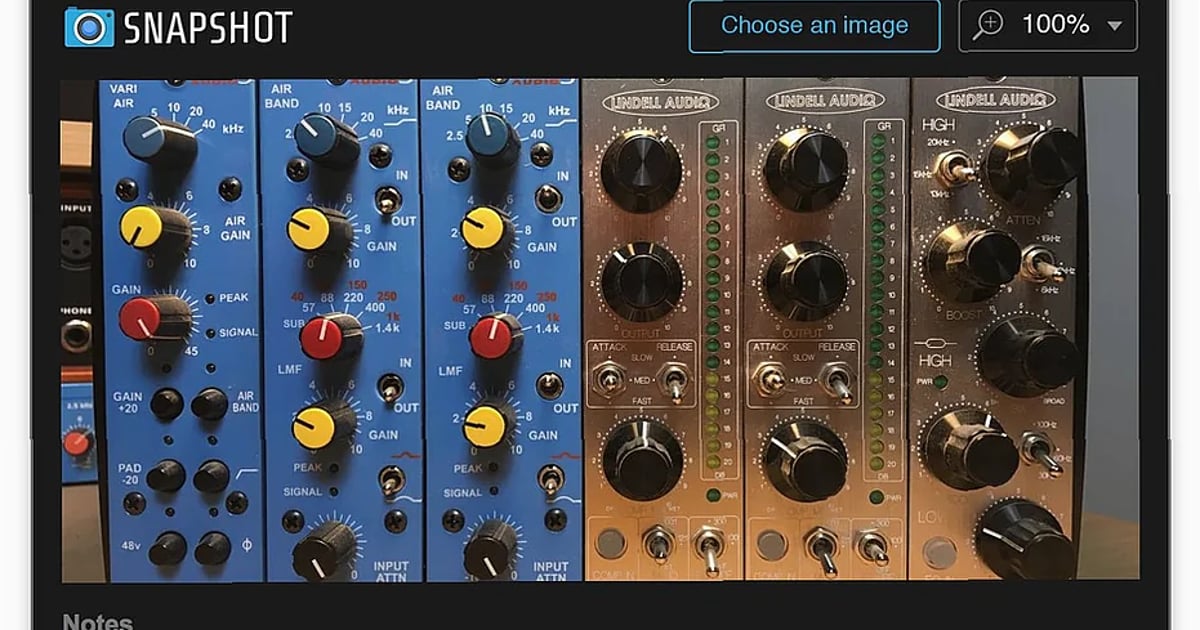
Snapshot Free Download
If you're trying to keep track of all the knobs, switches, and physical gear used in a recording session, Snapshot handles visual documentation right inside your DAW. It’s a free download that lets you store pictures of your hardware setups directly on your tracks.
You know the problem: you dial in a perfect sound on a vintage compressor or spend an hour positioning mics around a drum kit, only to forget the exact settings weeks later when you need to recall the session or recreate the sound. Snapshot solves this by letting you take pictures with your phone and load them into your project file, so your visual notes stay with the audio.
How It Works: A Visual Notepad for Your Gear
At its core, Snapshot is a utility plugin that displays images. You load pictures into it—typically photos you’ve taken of your outboard gear, amp heads, pedalboards, or microphone placements—and it displays them within your DAW’s plugin window. Because it’s a plugin, you insert an instance on the specific track or bus where that piece of hardware was used, tethering the visual documentation to the relevant audio.
What You Can Do With It
Store Pictures in Your DAW Tracks
This is the main function. Instead of having a folder of photos on your desktop that’s separate from your session file, you insert a Snapshot plugin on a track and load your image there. The picture becomes part of the saved project, so everything is in one place.Load and Cycle Through Multiple Images
You can load several images into a single Snapshot instance and move through them easily. This is useful for documenting a piece of gear from multiple angles or showing different stages of a setup.Maintain Original Image Proportions
Snapshot displays each image in a set in their original aspect ratio. Your photos won’t be stretched or distorted to fit the plugin window, which is crucial for clearly reading small labels on hardware.Rotate Images for Better Viewing
If you took a photo in portrait orientation, you can rotate each image within Snapshot to view it correctly without having to edit the file outside your DAW.Add Notes for Context
You can add notes to each instance of Snapshot. Use this to jot down extra details that aren’t visible in the photo, like the serial number of the unit or the type of cable used.Technical Specifications
Snapshot comes in all standard plugin formats: AAX, AU, VST, and VST3. It works on Mac OS X 10.9 and above and Windows 10. A key point is that it uses minimal resources, so having multiple instances open won’t burden your CPU.Who Should Grab This Plugin
This fits specific, practical scenarios for engineers and producers working with analog gear. It’s for the recording engineer who needs to document the exact settings on a vintage 1176 compressor used on a vocal chain before the unit gets packed away. It’s for the producer tracking a guitarist and wanting to store guitar amp settings—knob positions, which pedal was engaged—for future overdubs. It’s essential for the engineer who meticulously places microphones around a drum kit or guitar cab and needs a reliable way to recall that mic set-up months later for session consistency or for a mix revision.
As the developer puts it, "It's like a chinagraph for the 21st century"—replacing the grease pencil marks on tape machines with a more powerful, organized digital system.
Limitations to Consider
The provided facts don’t list any specific limitations. However, since it’s an image viewer at heart, it doesn’t analyze your photos or automatically read settings. The onus is on you to take clear, well-framed pictures. It also doesn’t replace detailed notetaking in a session log; it complements it with visual proof.Final Verdict
Download Snapshot if your workflow involves analog hardware and you’re tired of losing the visual details of your setups. You get a straightforward tool that embeds reference photos directly into your session file, which is invaluable for recall and collaboration. It requires you to be disciplined about taking photos as you work, but if you do, it solves the very real problem of forgotten hardware settings. For a free download that uses almost no CPU, it’s a no-brainer for anyone in this specific situation.FAQ
What are the system requirements for Snapshot?
Snapshot requires Mac OS X 10.9 or above. It supports AAX, AU, VST, and VST3 plugin formats.
What can I do with Snapshot in my DAW?
Snapshot lets you load and view multiple images within your DAW tracks, useful for documenting hardware settings like compressor configurations, guitar amp settings, or mic placements. You can rotate images, add notes to each instance, and move through multiple images easily while maintaining their original aspect ratios.
How does Snapshot store images in my DAW session?
Snapshot works as a plugin that stores pictures directly in the tracks of your DAW. Each instance can hold multiple images that you can navigate through and annotate with notes.
Are there any limitations or restrictions with the free version?
No limitations are specified for Snapshot. The software includes full functionality for loading multiple images, rotating them, adding notes, and storing them in your DAW tracks.