
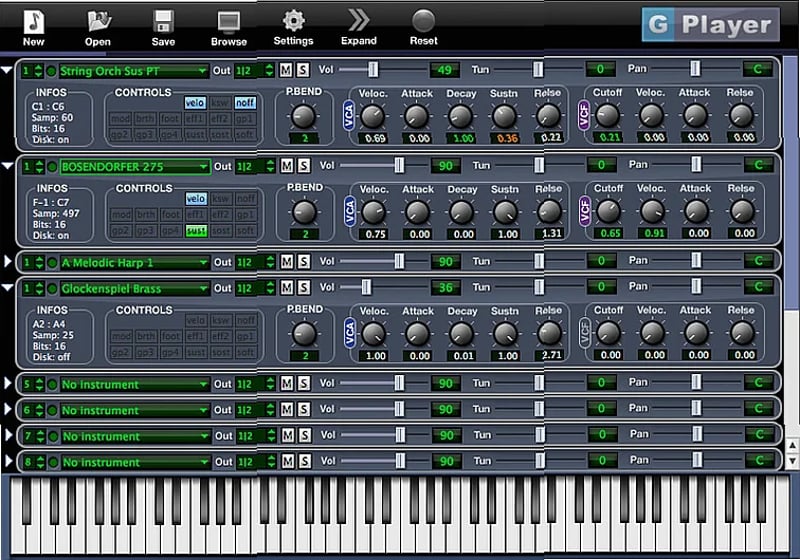
Need to play Giga sound libraries without converting them? Looking for a plugin that loads those massive orchestral samples directly into your DAW? G-Player is a free download that acts as a native bridge for the Giga format, letting you use your existing libraries right away.
It saves you the time and disk space of converting files. More importantly, its disk streaming feature lets you play sample libraries that are larger than your computer's available RAM, loading only what's needed into memory. For composers working with large orchestral sound libraries, this is a straightforward solution to a common bottleneck.
What G-Player Handles
This plugin is built to work with the specific features of Giga libraries. You get support for dimensions and keyswitches for articulation switching, and it can handle layered instruments. The main window gives you direct access to edit instrument parameters without digging through menus.A key feature is its memory management. When you load multiple instances of the same Giga instrument, the plugin shares the loaded samples across them. This means the samples are only loaded once, which can significantly reduce the overall memory consumption of your project.
Working with Samples and Sound
G-Player supports 24-bit sample library playback and streaming, running on a 32-bit floating point audio engine for internal processing. You can adjust the release time of all samples in the loaded instrument with a single knob, which is a quick way to tighten or lengthen the tail of sounds globally.For shaping sounds, it includes a multi-layer crossfade system with support for up to 8 layers. Each layer's crossfade curve is defined by 4 points for both the fade-in and fade-out segments, giving you detailed control over how layers blend.
Who Should Grab This
This is specifically for music producers and composers who already own libraries in the Giga format and want to use them in a modern DAW workflow. It fits if you're trying to play large orchestral sound libraries that exceed your system's RAM, as the disk streaming is built for that. It's also useful if your projects use many instances of the same Giga instrument, as the shared sample loading will help keep memory use in check.On the technical side, you'll need a VST, AU, or AAX compatible host on either macOS or Windows. The plugin doesn't convert your libraries, so you need the original Giga files to get started.
 Popular





 Categories


