A TriggerGate Free Download for Rhythmic Audio Chopping
Need to chop up audio into tight, tempo-synced patterns without manually drawing automation or chaining multiple plugins? A1TriggerGate addresses this. It’s a sequenced gate plugin that locks to your DAW’s tempo, letting you apply rhythmic gating and integrated effects in one place. It’s a straightforward free download from Alex Hilton / A1AUDIO.
Key Takeaway
A1TriggerGate gives you an 8-pattern sequencer to rhythmically gate any audio signal. You get integrated filter, drive, and delay effects alongside the gate, and you can switch patterns via automation for evolving arrangements. It’s built for tempo-synced chopping in electronic music.
Core Technology: The Sequenced Gate
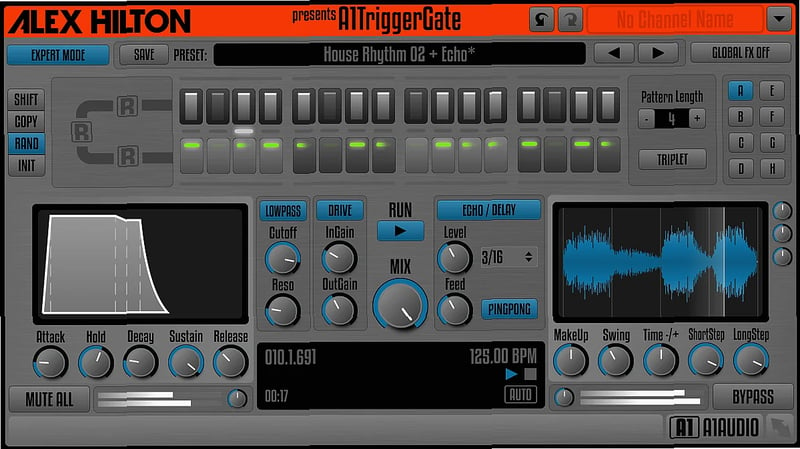
The plugin’s central mechanism is a 16-step sequencer (or 12 steps in Triplet mode) that controls an audio gate. Each step can be one of four states: a short gate, a long gate, a linked step, or off. You have an individual volume fader for each step to shape the dynamics of the pattern. Everything synchronizes directly to your host sequencer’s tempo, so your gating patterns stay in time.
Feature Breakdown
Pattern Sequencing and Control
You have 8 independent gate patterns. Each pattern sequence is 4 beats long, divided into 16 steps (or 12 in Triplet mode). You can switch between these 8 patterns using DAW automation, allowing for evolving rhythmic arrangements within a single plugin instance.
Step Types and Editing
Each step in the sequence isn’t just on/off. You set it as a ‘ShortStep’, ‘LongStep’, ‘StepLink’, or ‘NoStep’. This gives you control over the gate’s timing and behavior per step. The Expert Mode adds four pattern command tabs with functions to shift steps left/right, copy and paste, initialize, or apply a random command to step lengths for quick inspiration.
Integrated Effects Chain
Alongside the gate, A1TriggerGate includes an integrated lowpass filter, a drive/distortion stage, and an echo/delay. A Global FX Off switch lets you temporarily bypass all these effects at once, which is useful for stepping through presets or isolating the gate’s action.
Automation and Workflow
All parameters are automatable. Every adjustment you make is also fully undoable and redoable within your DAW. The GUI is fully vector-based and resizable, so it looks sharp on high-resolution displays and remains usable at small sizes.
Technical Specifications
The plugin comes in VST, VST3, AU, and AAX formats. It’s compatible with both Mac and PC systems, running in 64-bit. It reports no latency.
Who Is This For?
This fits professional producers working on electronic music who need to create precise, tempo-locked trance gate effects. It’s useful if you’re applying rhythmic gating to pads, leads, or drums and want to switch between multiple pre-set patterns via automation instead of managing several plugin instances. The integrated effects mean you can shape the gated sound without adding extra plugins to your chain.
Limitations
The provided facts list no specific limitations. As with any plugin, your experience will depend on your system compatibility. Since it’s a
fresh air plugin focused on a specific task, it doesn’t aim to be a multi-effect workstation.
Final Verdict
If your work involves electronic music and you need a dedicated tool for creating tempo-synced gate patterns with some built-in sound shaping, A1TriggerGate is a practical, no-cost solution. You get eight automatable patterns, useful integrated effects, and a solid sequencing workflow. It does one job and does it without fuss. For a
free download that handles rhythmic chopping, it’s worth adding to your FX toolkit.
We’ve selected a few plugins that might interest you in the FX category.
Most of them work in popular VST2/VST3 hosts such as FL Studio, Ableton Live, Cubase, Studio One, and REAPER.


 Popular





 Categories


